
A scale converter is a useful online tool for converting measurements between different scales and understanding the relationship between real-world measurements and scaled measurements. Whether you are working with maps, architecture, models, drawings, weight measurements, or other conversion problems, a scale converter can save time and reduce calculation errors.
Our online scale tool is designed for simple and practical calculations. You can use it to understand map scale, calculate a scale factor, convert measurements, and work with different scale ratios.
If you regularly need to calculate distances on maps or convert measurements from one scale to another, an online scale calculator provides a convenient alternative to doing every calculation manually.
The global architectural services market was valued at USD 421.78 billion in 2024 (Straits Research, 2024) — and every project in it depends on accurate scale conversion at some point. This is one of the most practically needed tools in design and construction. |
A scale converter is a calculation tool that helps you move between measurements, ratios, and scaled representations. The most common use is converting a drawing, map, blueprint, or model measurement into its real-world equivalent. For example, a 1:100 scale means one unit on the scaled representation corresponds to 100 of the same units in reality.
People commonly search for terms such as scale calculator, scale conversion calculator, scale conversion tool, scale ratio converter, online scale calculator, scale measurement calculator, and scale converter calculator because they want an immediate answer rather than a manual formula.
Example: On a floor plan drawn at 1:50, you measure a wall as 24 mm long. Multiply 24 by 50 = 1,200 mm = 1.2 metres actual length. A scale converter does this calculation for you in under a second. |
Ready to calculate? Use the Scale Converter above instead of repeatedly calculating the ratio manually.
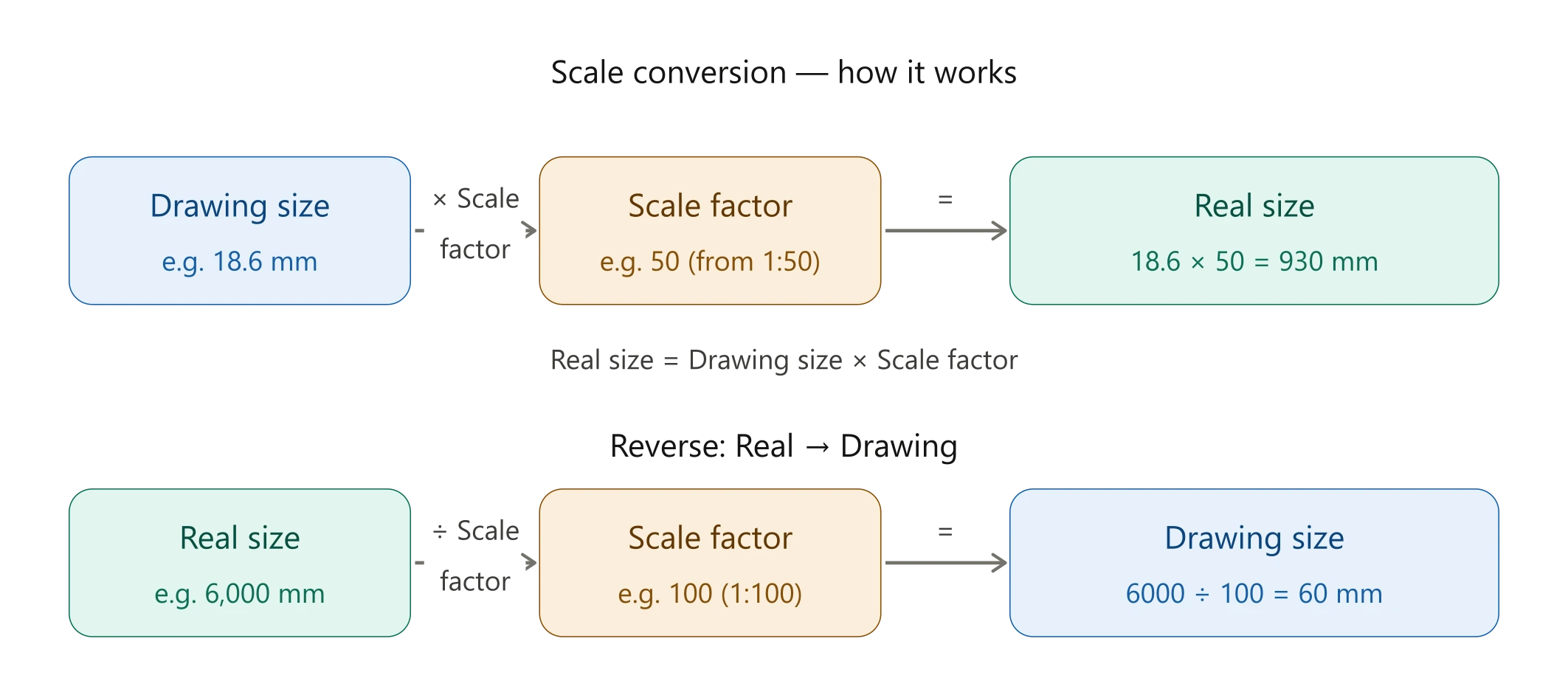
A scale ratio expresses the relationship between a representation and the actual object or distance. In a ratio such as 1:50, the first number represents one unit on the drawing or model and the second number represents 50 of the same units in the real world. The same principle applies to map scale, architectural scale, model scale, and many other scale conversions.
Scale | Relationship | Common use |
1:1 | Same size as the original | Full-size representation |
1:10 | 1 unit represents 10 units | Small models and scaled drawings |
1:50 | 1 unit represents 50 units | Plans and technical drawings |
1:100 | 1 unit represents 100 units | Architecture and mapping |
1:1,000 | 1 unit represents 1,000 units | Large-area mapping |
1:100,000 | 1 unit represents 100,000 units | Regional maps |
A scale factor describes how much a measurement has been enlarged or reduced. One of the most common questions in this topic is how to find scale factor. A basic scale factor can be calculated by comparing the scaled measurement with the corresponding original measurement.
Scale Factor = Scaled Measurement ÷ Actual Measurement
For example, if an object is 10 meters long and its model is 1 meter long, the scale factor is 1 ÷ 10 = 0.1. The model is therefore one-tenth of the original, commonly expressed as a 1:10 scale.
Searches such as how to calculate scale factor, how to find a scale factor, calculate scale factor, scale factor formula, scale factor equation, find the scale factor calculator, and scale factor solver all describe closely related tasks. The wording changes, but the underlying idea is the same: compare corresponding measurements using consistent units.
If you need to work with several scale ratios, an online scale factor calculator can save time and make it easier to check your results.
Map scale is one of the most important applications of a scale converter. It tells you the relationship between a distance measured on a map and the corresponding distance on the ground. You may see searches such as what is a scale for maps, what is the scale of a map, what is map scale, what is a scale on a map, what is a scale in geography, map scales, geographic scale, geographical scale, cartographic scale, and representative fraction map scale.
A map can show scale in several forms. A ratio or representative fraction might appear as 1:50,000. A verbal scale might say 1 inch equals 1 mile. A graphic or linear scale uses a bar that can be measured directly. All of these communicate the same basic idea: map distance is related to real-world distance.
Map scale type | Example | Meaning |
Ratio scale | 1:50,000 | 1 map unit represents 50,000 real units |
Verbal scale | 1 inch = 1 mile | Relationship stated in words |
Graphic scale | Bar or line | Distance can be compared visually |
Representative fraction | 1/100,000 | Map distance as a fraction of actual distance |
To calculate a real-world distance from a map, first identify the map scale and measure the map distance. Then apply the scale ratio. For example, at a 1:100,000 scale, 1 centimeter on the map represents 100,000 centimeters on the ground, which is 1 kilometer.
Therefore, if two locations are 7 centimeters apart on a 1:100,000 map, the corresponding ground distance is approximately 7 kilometers. This simple example shows why a map calculator or map scale calculator can be useful when distances become larger or when several conversions are required.
Common searches include how to calculate map scale, how to find the scale of a map, how to determine map scale, how to calculate map distance, how to use a map scale, how to figure out map scale, how to find scale on a map, map scale ratio, ratio scale on a map, linear scale map, verbal scale map, and distance scale on a map.
Map scale | Map distance | Approx. real distance |
1:10,000 | 1 cm | 100 m |
1:50,000 | 1 cm | 500 m |
1:100,000 | 1 cm | 1 km |
1:500,000 | 1 cm | 5 km |
1:1,000,000 | 1 cm | 10 km |
A map calculator is useful when you need to translate map measurements into real distances or work in the opposite direction. Instead of repeatedly converting centimeters to kilometers or inches to miles, you can enter the relevant information into a calculator and use the resulting value.
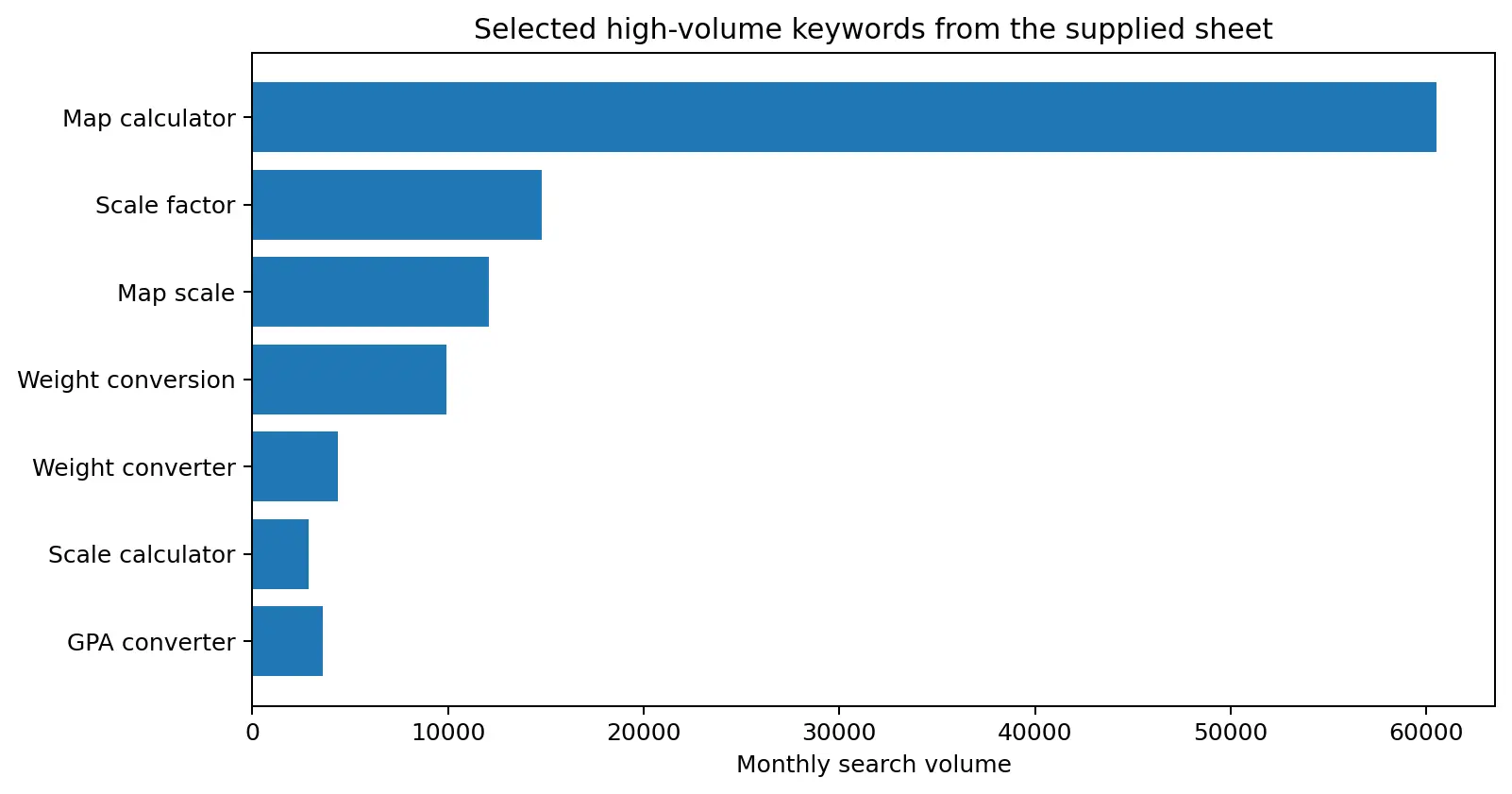
The keyword data also contains variations such as map calculator, map calculator online, map calculate, map calculator online, maps calculator, map scale calculator, scale calculator map, scale of maps calculator, map scale conversion calculator, and map scale ratio calculator. These variations indicate strong practical intent: users are generally looking for a tool that can give them a result.
A 1:160 scale means that one unit on the model or drawing represents 160 of the same units on the original. For example, 1 centimeter on a model represents 160 centimeters in real life. This scale is often encountered in miniature models and model railways.
The same concept applies to 1:10 scale, 1:20 scale, 1:50 scale, 1:100 scale, 1:144 scale, 1:200 scale, 1:500 scale, and other ratios. When someone asks what does 1 160 scale mean, the key is to read the ratio as one unit of the representation compared with 160 units of the original.
Architects, engineers, builders, students, and designers regularly work with scaled drawings. An architectural scale calculator or architecture scale converter can translate drawing dimensions into real-world dimensions. Common architectural scales include 1:20, 1:50, 1:100, 1:200, and 1:500.
Related searches include architectural scale calculator, architectural scale converter, architecture scale calculator, arch scale, archi scale, architectural scale factors, blueprint scale converter, blueprint scale calculator, drawing scale calculator, drawing scale conversion calculator, drafting scale, construction scale, engineering scale to inches, engineer scale to inches, and architectural scale conversion calculator.
For example, on a 1:100 drawing, 1 centimeter represents 100 centimeters in reality. A 4-centimeter line therefore represents 4 meters. Always verify the scale printed on the drawing before calculating.
Scale drawings reduce or enlarge an object while preserving its proportions. A model scale follows the same principle. A 1:10 model is one-tenth the dimensions of the original in each linear direction. A 1:100 model is one-hundredth the corresponding linear dimensions.
Useful searches from the supplied keyword list include model scale, model scale calculator, model scale converter, model scales conversion, scale model converter, scale model size chart, miniature scale calculator, 3d print scale, 3d printer scale, LEGO scale converter, HO scale converter, HO scale calculator, N scale converter, N scale ratio, and model scaling calculator.
When scaling an object, remember that linear dimensions and area do not change in exactly the same way. If a linear dimension is reduced by a factor of 10, an area measurement changes by a factor of 100. This distinction matters when working with floor plans, land areas, maps, and technical drawings.
To scale down a measurement, divide the original measurement by the scale denominator when using a ratio such as 1:10 or 1:100. For example, an original length of 250 centimeters at 1:10 becomes 25 centimeters.
People often search how to scale down, how to scale down measurements, how to scale something down, scaled measurements, scaling measurements, scaling dimensions calculator, scale down calculator, and scaling tool. These are all variations of the same practical task.
The supplied keyword sheet also contains a large group of weight-related searches. These include weight conversion, weight converter, weight converting, weight measurements, weight conversion calculator, weight conversion units, weight conversions, weight conversion table, converter for weight, online weight converter, weight calculator conversion, kilogram converter, kg calculator, pound calculator, lbs calculator, and pounds to kilograms scale.
A weight converter helps you change a measurement from one unit to another. Common units include kilograms, pounds, grams, ounces, and milligrams. The conversion you need depends on the original and target units.
Value | Approximate equivalent |
1 kilogram | 1,000 grams |
1 kilogram | ≈ 2.20462 pounds |
1 pound | ≈ 453.592 grams |
1 ounce | ≈ 28.3495 grams |
For example, to convert 10 kilograms to pounds, multiply 10 by 2.20462 to get approximately 22.05 pounds. An online weight conversion calculator is useful when you need repeated conversions or more decimal precision.
For health-related measurements, BMI calculator can be used to calculate Body Mass Index from height and weight. This is different from a weight converter: a weight converter changes units, while BMI uses height and weight to calculate a health-related index.
To convert pounds to kilograms, multiply the pound value by approximately 0.45359237. For example, 10 pounds is approximately 4.54 kilograms. This is why searches such as how to convert pounds to kilograms on a calculator, pounds to kilograms scale, lb conversion, convert lbs to, weight to kilogram calculator, and wt to kg calculator are common.
To convert kilograms to pounds, multiply kilograms by approximately 2.20462. Always check the unit shown by the calculator before recording the final answer.
Searches such as how much does it weigh, how much does this weigh, how much do I weigh, what is my weight in kg, how many kilograms do I weigh, how to calculate weight in kg, how to measure weight, how to read a digital scale in ounces, and how to read weighing scale in kilograms are often asking for measurement guidance rather than scale-ratio calculations.
A digital weighing scale gives a measured value, while a conversion calculator changes that value into another unit. If a scale shows kilograms and you need pounds, use the appropriate conversion rather than treating the displayed number as a different unit.
Another major keyword group in the supplied sheet concerns GPA conversion. Searches include GPA converter to 4.0 scale, GPA to 4.0 scale converter, convert GPA to 4.0 scale, converting GPA to a 4.0 scale, GPA converter 5.0 scale, grading scale converter, convert grades to 4.0 scale, and 5.0 scale to 4.0 GPA converter.
GPA conversion is not always a simple universal mathematical conversion. Schools, universities, countries, and application systems may use different grading policies. If you are converting a GPA for an official application, follow the conversion method required by the institution.
For example, a 5.0 grading system should not automatically be converted to a 4.0 GPA by simply multiplying or dividing without checking how grades are defined. A GPA scale converter can provide a useful estimate when the conversion method is known, but official requirements should take priority.
Scale conversion can also refer to temperature. The most common temperature scales are Celsius, Fahrenheit, and Kelvin. The supplied keyword data includes temperature scale converter, convert to Kelvin scale, convert Celsius to Kelvin scale, convert Fahrenheit to Kelvin scale, and questions such as converting 300K or 573K to Celsius.
Conversion | Formula |
Celsius to Fahrenheit | °F = (°C × 9/5) + 32 |
Fahrenheit to Celsius | °C = (°F − 32) × 5/9 |
Celsius to Kelvin | K = °C + 273.15 |
Kelvin to Celsius | °C = K − 273.15 |
For example, 300 K is approximately 26.85°C, while 573 K is approximately 299.85°C. When using a calculator, make sure the input and output scales are clearly selected.
Category | Example | Key idea |
Scale ratio | 1:10 | 1 unit becomes 10 real units |
Architectural | 1:100 | 1 cm drawing = 100 cm real |
Map | 1:100,000 | 1 cm map = 1 km real |
Model | 1:160 | 1 model unit = 160 real units |
Weight | kg → lb | Multiply kg by ≈2.20462 |
Temperature | K → °C | Subtract 273.15 |
GPA | 5.0 → 4.0 | Use the institution’s accepted method |
Fast results: You can perform common calculations without repeatedly writing formulas.
Convenient unit conversion: Measurements can be compared after converting them into compatible units.
Useful for multiple tasks: Maps, architecture, models, drawings, weight, and temperature all involve conversion concepts.
Reduced manual arithmetic: A tool can reduce simple calculation mistakes, especially when several conversions are involved.
Easy to use: A clear calculator is practical for students, professionals, hobbyists, designers, and everyday users.
A Scale Converter can simplify a wide range of calculations, from map scale and scale factor problems to architectural drawings, model dimensions, weight conversion, and temperature scales. The supplied keyword research shows that users search for this topic in many different ways, including map calculator, map scale, scale factor, weight conversion, weight converter, scale calculator, architectural scale calculator, scale ratio conversion, and many question-based phrases.
The fastest way to get started is simple: use the Scale Converter above, enter the values you know, select the correct scale or unit, and review the result. When you need another measurement tool, BMI calculator and Sleep Calculator can help with related everyday calculations.
For accurate results, always check your units, scale direction, and the purpose of the calculation. A calculator can make the arithmetic easier, but understanding the scale relationship helps you recognize whether the final answer makes sense.
Save Time on Every Scale Conversion Bookmark this tool now. Whether you’re working on blueprints, maps, models, or coursework — accurate scale conversion is one click away, every time. Bookmark This Scale Converter for Future Use |